
Category: Video Editing

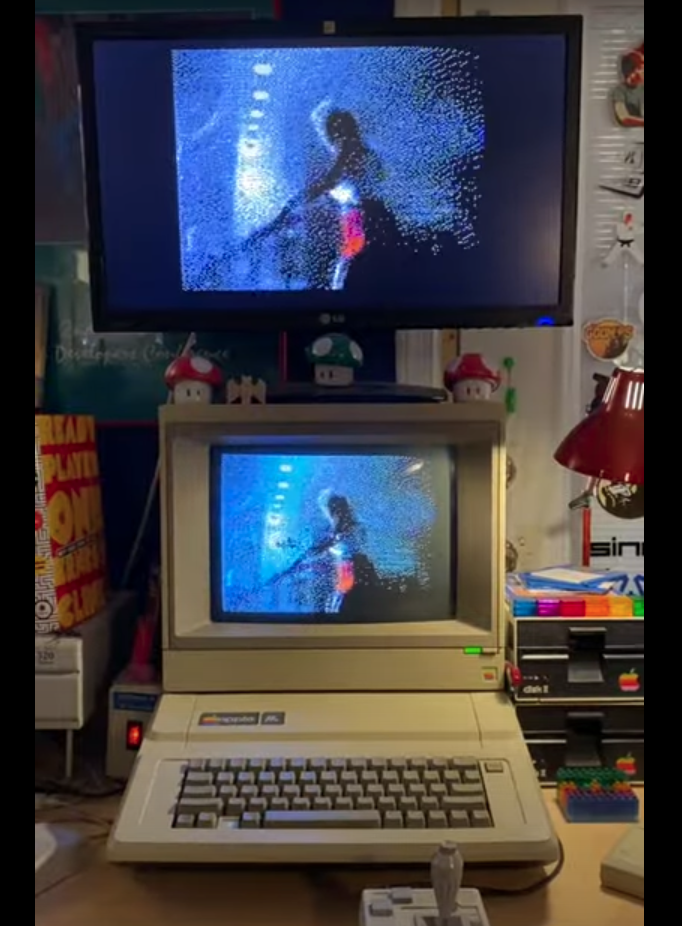
Kris Kennaway has released a video of the January 1984 Apple ad running in Full Motion Double Hi-Resolution Video complete with Playback on the Apple IIe computer. Now, before you say, the Apple IIe cannot do that, there are a few items you will need which were not available in 1984. First, you will need a 128k Enhanced Apple IIe running the software, also known as II-Vision version 0.2 by Kris Kennaway, allowing conversion or “transcoding” of the video files…

The Handbrake Team has released the latest version of their Handbrake video conversion software. Version 1.3.2 includes a bevy of fixes, changes, and updates, of which a full listing can be found in the Handbrake 1.3.2 release notes on their Github Page at:https://github.com/HandBrake/HandBrake/releases/tag/1.3.2 The latest version of the Handbrake software is available for free from their website at: https://handbrake.fr


Happy Canadian Thanksgiving everybody. This review will be just a quick one. I’m not an expert with this sort of thing and have only dabbled with it from time to time… What is it? Handbrake is simply a transcoder. It converts DVD’s to video files and video files from one format to another. Does it work? Yes. It does what it was designed to do quite well and actually is fairly stable in spite of having not been updated in…


These videos somehow got overlooked by us when we were talking about new software this fall. The video editing system Final Cut Pro is a highly intricate piece of software that takes a good number hours of usage to master, yet now there is a shortcut of sorts now. Apple released a number of free videos about using the program this past year and they are available on the Apple website at: http://support.apple.com/videos/#finalcutpro While they are not a full support…



