
Category: Apple //c


The 6502 Workshop team is pleased to announce that the Kickstarter campaign for the boxed edition of Nox Archaist is now live! Click here to pledge! What’s better than a brand new, hand-coded 8-bit classic 80s era tile based RPG? Answer: One that comes in an awesome collector’s edition box with lots of cool physical goodies! What’s even better than that? When the game will also feature an NPC appearance by Lord British, the alter ego of Richard Garriott, the creator of the Ultima series of…


The Apple II floppy emulator options have been shrinking lately, with availability being limited to a few devices. From the CFFA 3000 last run to most other devices deprecated, there’s only two or three available right now. That’s why KbooHK coming into the Apple II community is quite welcome, and their product promises a great deal by supporting the new .Woz file format. The Wdrive is a small device, very well designed and built, It is a real floppy replacement…
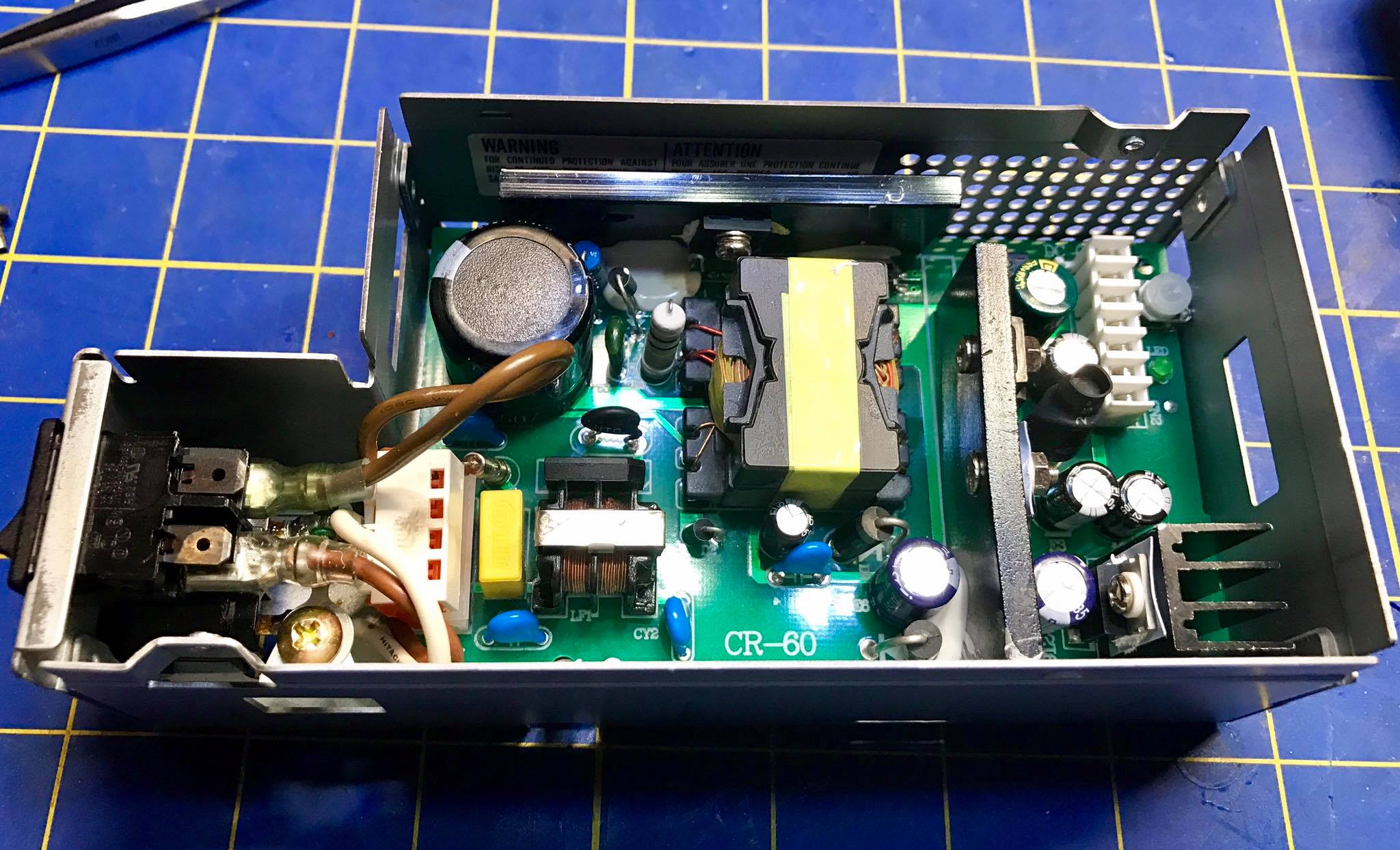
I recently had the opportunity to beta test the new ReactiveMicro Apple IIc Plus Universal Power Supply, and it’s a beauty! The Apple IIc Plus was the last version of the already popular portable version of the Apple II. It featured a 4 MHz processor, expandable memory, internal 3.5 floppy drive, and new serial connectors. But the best feature was the lack of “brick on a leash” that plagued the original //c. This gave this model the freedom and portability…


David Schmenk has released his long awaited PLASMA programming language for the Apple II series computers. Under development since 2006, version 1.0 of PLASMA can be run both from floppy as well as from hard disk. It includes a bevy of improvements and enhancements with a number of people from the Apple II community taking part in improving this release. According to David’s website, PLASMA officially can support the 65802 as well as the 65816 16 bit features and can…

A firmware bug which affects both the Apple IIc and the Apple IIc Plus has been discovered by programmer, Michael Guidero. According to the posting on his blog, The bug, described in code and notes below came about as a result of his work on the Apple IIc and Apple IIc Plus emulation in MAME. The memory expansion firmware has the following code to test the size of the memory expansion card, if installed: numbanks equ $03bb ; screen hole…

6502 Workshop, LLC announces the launch of a Kickstarter campaign for Nox Archaist on September 16, 2017! http://kickstarter.noxarchaist.com Nox Archaist is an Ultima inspired 8-bit fantasy role-playing game with a classic Apple II look and feel, set in a world ruled by sorcery and swords. Players will explore a robust storyline within a non-linear world containing numerous castles, towns, dungeons, and NPCs. Nox Archaist features skills-driven character development and strategic turn-based combat scenarios which integrate with the game’s storyline. Nox…

Last year, 8bitdo, a Hong Kong company that specializes in Bluetooth and wireless controllers for retro systems, came out with a special receiver commemorating the Apple II after a successful kickstarter campaign. The key element of this device is the adapter that connects to the joystick port of the Apple II computers and converts it to Bluetooth, allowing the game pad to be used as a joystick on the Apple IIs. Unfortunately the users found out after receiving them that…

David Schmidt has announced the immediate availability of ADTPro 2.0.2. The latest update includes ProDOS 2.4.1 as the base operating system as well as a host of other new features and bug fixes including: New functionality: Support added for Uthernet II based on new integrated IP65 library from Oliver Schmidt (http://oliverschmidt.github.io/ip65/) Integrated John Brooks’ ProDOS 2.4.1 as base operating system for all ADTPro actions (Speediboot, text bootstrapping, base disks, etc.) [VDrive] Uthernet II virtual Ethernet driver from Oliver Schmidt that…

A new web store with on demand printing has opened, check it and fulfill your retro wearable! Update: New products added: picasso style graphics, vintage games! http://store.apple2faq.com

A few years ago I acquired a Franklin 500 computer. This was one of the few Apple //c clones that had extras and enhancements, as well as a “brick on a leash” power supply just like the //c. The excitement lasted me just a couple of days, then the power supply died. I looked around forums and groups in search of a replacement, but being such a ‘rare’ item, there were no replacements. I put away the computer but always…

The Apple II program server for the Raspberry Pi, A2Server has been updated. According to the posting on Facebook from Ivan Drucker, the author, this update includes fixes and also installs the latest GS/OS Releases. A2SERVER 1.2.5 is now available. Its main new feature is to offer to install GS/OS 6.0.1 for network boot (as it did before), as well as community releases 6.0.2 and 6.0.3. It also now includes HFS.FST with the install, and has a handful of…

A couple of weeks ago I reviewed Пламен Вайсилов’s VGA adapter for the //c. Needless to say, a lot of people was asking how to get one. Now the website’s store is finally open! Head up to a2heaven Store and get all your goodies from the Bulgarian Woz!

I just received an Apple //c VGA adapter from Пламен Вайсилов, a prolific Apple II hardware creator. This adapter has a button that lets you switch between video modes: color, green, mono and mono-white. also simulates scanlines in all those modes. Check the video. At the time of this post there has not been pricing and availability announced, keep checking Apple II heaven site. Also important to mention is that this is only NTSC, a PAL version is on the…

Charles Mangin of RetroConnector fame has posted photos of his Apple //c Plus Headphone Jack. At press time, the only information we have outside of the photos of the unit are a promise from Charles that installation video and documentation will be available soon. To view the Apple //c Plus Headphone Jack information, check out the RetroConnector blog at: http://retroconnector.com/updates/

For those of you who have been searching for a methodology of hooking up an Apple II to a TV via HDMI, Alex Lukacz’s latest experiment may be the answer you have been looking for. Using a BBBLack credit card sized computer, he has managed to wire up a reasonable connection allowing for the Apple //c video output to be displayed via HDMI. For more information, check out Alex’s website at: http://lukazi.blogspot.com.au/2015/08/a2-serial-video-to-hdmi-converter.html UPDATE: A video demonstration of the hack has…

Jimmy Maher, curator of The Digital Antiquarian has released a very in depth review of Leisure Suit Larry in the Land of the Lounge Lizards. His article goes into quite a bit of detail about Ken Williams, Sierra, as well as the back lash that they faced with publishing the program. The article also talks about Al Lowe and Mark Crowe’s involvement in the project and how it was kept under wraps in order to keep investors from dumping the…

After I gave a presentation on Retrobrite at KansasFest, people asked me to write about the process, never wrote about Retrobrite as there are so many articles and videos on the internet but finally found some time to write about it. There are many ways to Retrobrite. I avoid submerging because it’s a waste of peroxide, and maybe toxic for the environment, also don’t wrap in plastic as it allows areas to wrinkle and get more concentrated than others, promoting…

The AppleIIScans.net website has posted the Apple IIc Users Guide. The guide originally published in 1984 by Brady Communications and authored by Gary Phillips and Donald Scellato features the Picaso style Apple //c on the cover of the book. It is available in PDF format from the Apple2Scants.net website at: http://www.apple2scans.net/2015/04/20/apple-iic-user-guide/

For a long time I have been looking for the Apple //c Flat Panel LCD, one of the nicest items on the line. This monitor was short lived as its readability was poor and the item expensive. It was retired early so not many were produced, which is what makes them rare and sought today by collectors. I was lucky enough to be able to secure one, but quickly disappointed when first using it. I am a hands-on person that…

some years ago, I got a //c 9” green monitor, which worked fine for a few months, but I missed the color games. My options were connected to a TV (impractical) and also tried a small LCD monitor without success, as new monitors are 16:9, much more elongated than the traditional 4:3. The best solution was to get a replacement color monitor of the same size. In many forums asked if I could adapt Color Classic Macintosh monitors, Sony televisions…



